

 Microsoft Teams Integration
Business mobile, built into Teams
Employees order travel eSIMs and check connectivity directly inside Teams. No portals, no IT tickets. Admins control everything from the web dashboard.
How it works
Employees order and manage eSIMs directly in Teams, no email chains, separate portals, or spreadsheet tracking. IT has full visibility through the admin portal.
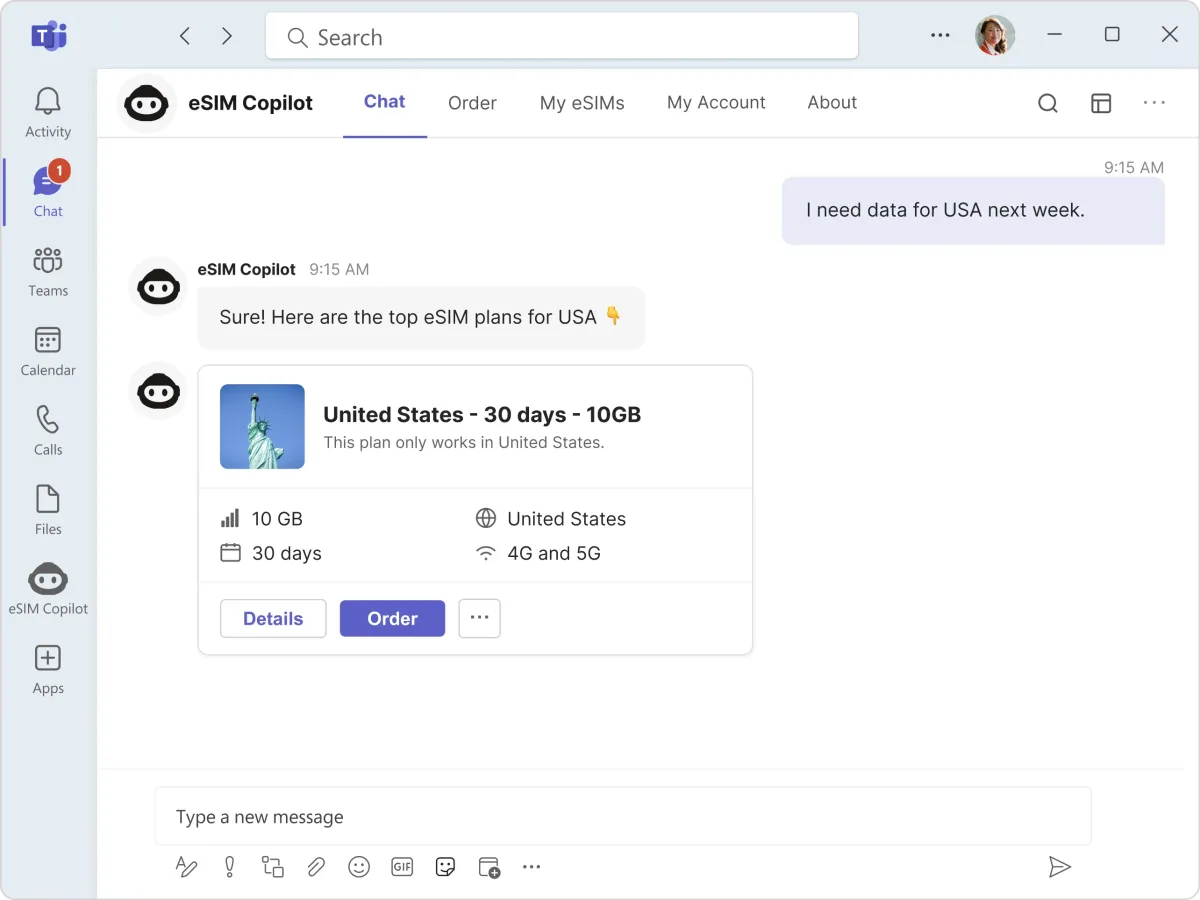
What employees get inside Teams
Teams Bot
Natural language commands to search plans, order eSIMs, and check status. Just type what you need.
Order & Manage Tabs
Dedicated tabs for ordering plans and managing eSIMs, embedded directly in Teams.
Adaptive Cards
Interactive cards for order confirmations, approval requests, and status updates delivered in real time.
Approval Workflows
Managers approve or decline eSIM requests with one click. No portal login required.
Azure AD SSO
Sign in with Azure AD, no separate credentials. Users are verified the moment they open the app.
Proactive Alerts
Automatic notifications for low data, approaching expiry, and policy-triggered reminders before travel.
Admin Portal
IT manages spending controls, budgets, usage analytics, and policy enforcement from the web dashboard.
Multi-Tenant
Enterprise architecture for organizations with multiple subsidiaries, each with isolated policies and billing.
Before vs. After eSIM Copilot in Teams
Before
- 1Employee emails IT with travel dates
- 2IT responds 4-24 hours later with questions
- 3Employee replies with destination details
- 4IT logs into a separate eSIM portal
- 5IT searches for matching plans
- 6IT places order, awaits manager sign-off via email
- 7Manager eventually approves in their inbox
- 8QR code sent to employee by email
With eSIM Copilot in Teams
- 1Employee types request in Teams chat
- 2Bot suggests matching plans instantly
- 3Employee picks a plan with one click
- 4Policy engine auto-approves (or routes to manager card)
- 5QR code delivered in Teams chat. Done in 90 seconds
Security, Compliance & Control
SSO & Azure AD
Authenticate users through your existing Azure Active Directory. No additional credentials to manage.
RBAC
Role-based access control at the team, department, and organisation level. Least-privilege by default.
Audit Logging
Comprehensive logs of every action. Full visibility for compliance reviews and investigations.
GDPR Compliant
Hosted in the UK and EU with data protection built in.
Easy Deployment
Works with your existing systems, policies, and workflows. No disruption, no training required.
Spend Controls
Apply spend, usage, and access policies by user, team, or department. Real-time oversight for IT and Finance.
Real-Time Webhooks
Feed event data into your centralised logging, SIEM, or security engine in real time.
Replace Unmanaged Apps
Remove unknown consumer eSIM apps from your estate. One managed source, known networks, full visibility.
Create your free account.
Founded by telecoms veterans with 30+ years of experience. Meet the team. Takes 60 seconds.